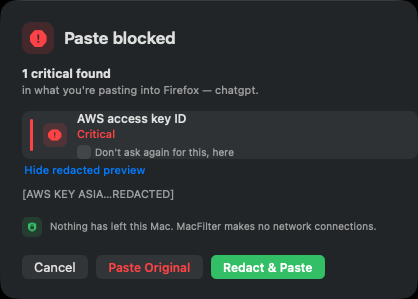
Every privacy-focused app makes the same promise somewhere on its website: your data never leaves your machine. Almost none of them give you a way to check. On macOS you can check it yourself, in two commands, without trusting anybody.
The two commands
The first lists the dynamic libraries a binary is linked against:
otool -L /Applications/SomeApp.app/Contents/MacOS/SomeApp
Networking on macOS goes through a small number of well-known places. CFNetwork is the
one that matters most — URLSession, NSURLConnection and essentially every
high-level HTTP API sit on top of it. Network.framework is the modern lower-level
option. Their absence from the link list is meaningful.
The second lists every external symbol the binary calls:
nm -u /Applications/SomeApp.app/Contents/MacOS/SomeApp
Here you're scanning for the giveaways: NSURLSession, CFURL-prefixed symbols,
_socket, _connect, _getaddrinfo, _dnssd. A binary
that talks to a network has to call something, and that something shows up here.
A clean result looks boring: AppKit, Foundation, CoreGraphics, libSystem, the Swift runtime, and nothing else. No CFNetwork in the link list, no URL-loading symbols in the undefined list.
What this proves, precisely
It proves the binary contains no linked networking API. Not "the developer chose not to send anything" — there is no code present to send it with. That's a materially stronger statement than a privacy policy, and it survives the developer changing their mind, because changing it requires shipping a different binary that you can re-check.
What it doesn't prove
Being honest about the gaps matters more than the technique, because a half-understood check is worse than none:
- Raw sockets hide in libSystem.
socket(),connect()andgetaddrinfo()live inlibSystem.B.dylib, which every binary links. Their presence in the link list means nothing; you have to checknm -ufor the symbols themselves. - Subprocesses. An app that shells out to
curlexfiltrates data without linking a single networking symbol. Checknm -ufor_posix_spawn,_system,NSTask. - Other binaries in the bundle. The main executable isn't the whole app. Helper tools,
XPC services and embedded frameworks are separate Mach-O files that can do their own networking. The
complete check walks all of them:
find SomeApp.app -type f -perm +111 -exec otool -L {} \; - Scripting runtimes. If the app embeds Python, Node or a JavaScript engine, the networking can live in interpreted code that no static symbol check will ever see.
The stronger check: watch it run
Static analysis tells you what's possible. If you want to know what actually happens, observe it:
lsof -i -a -p $(pgrep SomeApp)— every network socket that process currently has open. Run it while you exercise the app's features.nettop -p $(pgrep SomeApp)— live per-process network throughput, which will show traffic even if you miss the socket in a snapshot.- An outbound firewall — Little Snitch or the free LuLu — which prompts on every new outbound connection. This is the version of this check that runs permanently, in the background, for every app you own.
Runtime observation catches the cases static analysis misses, at the cost of only proving something about the specific run you watched.
Why an app should hand you the commands
Here's the part that's a design argument rather than a technical one.
A privacy claim the user cannot check is a marketing claim, and users have correctly learned to discount marketing claims. Putting the verification commands in the app's own About screen, with a button that copies them to the clipboard, costs one button. What it buys is converting an assertion into a test the sceptical user can run in ten seconds — and the sceptical user is exactly the person who cares enough to be worth convincing.
It's most warranted for the apps where trust is hardest to ask for. A tool whose entire function is inspecting your clipboard before you paste is, by construction, reading your most sensitive text all day long. That app has less business asking you to take its word for anything than almost any other category of software.
Try it on something you already trust
The technique isn't specific to any one app. Point it at the menu bar utilities already running on your Mac — the clipboard manager, the window tiler, the note-taker. Some of them will have very good reasons to link CFNetwork. Some of them won't, and you'll learn something.
MacFilter checks what you paste into AI tools, entirely on-device — and ships the verification commands in its own About screen.
See MacFilter →