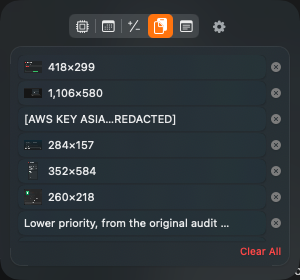
A clipboard manager makes you an offer: it will watch the system pasteboard forever and write down everything it sees, so you can get back the thing you copied twenty minutes ago. Most of the time what it writes down is a URL or a code snippet.
Some of the time it's the password you just copied out of 1Password.
The convention nobody enforces
macOS has no built-in notion of a "secret" pasteboard item. The pasteboard is a dumb bag of typed data, and anything that can read it can read all of it. What exists instead is a community convention, documented at nspasteboard.org, built on extra pasteboard types that carry no payload and exist purely as markers:
org.nspasteboard.ConcealedType— "this is a secret; don't store it."org.nspasteboard.TransientType— "this is ephemeral; it'll be replaced shortly."org.nspasteboard.AutoGeneratedType— "a program put this here, not a human."
Password managers set the first one when they copy a credential. 1Password, Bitwarden and KeePassXC all do. The clipboard manager's side of the bargain is to check for those markers and skip the item entirely.
It is, strictly, a gentlemen's agreement. The OS does not enforce it, there is no API that will refuse to hand you the string, and a tool that ignores the convention works perfectly well — it just quietly archives your passwords to disk.
Honouring it is three lines and one ordering detail
The implementation is trivial: keep a set of the marker types, and before recording anything, check whether the pasteboard's current types intersect it. The detail that matters is ordering. The check has to happen before you read the string and before you write anything down — not as a filter applied to an item you've already stored. Store-then-filter means the secret hit your disk, and on most filesystems that's recoverable afterwards.
The other easily-missed case is the poll loop. Clipboard managers work by polling
NSPasteboard.changeCount, and a naive implementation reads the string first and inspects
types second. Same bug, harder to spot.
The half the convention doesn't cover
Here's the uncomfortable part: the convention only protects secrets that a cooperating app put on the pasteboard. It does nothing for the secrets you copy by hand, which is most of them.
- An API key out of a
.envfile in your editor. - A database password out of a Slack message from a colleague.
- A one-time code out of a terminal, or an SSH private key out of
cat.
None of those carry a marker. Your clipboard manager will faithfully record every one, because from its point of view they're indistinguishable from a URL.
Which means the on-disk file is the real security boundary, and it's usually the part nobody looks at.
Clipboard history typically lands in ~/Library/Application Support/ as a plain JSON file.
Files created there inherit macOS's default mode of 0644 — owner writes,
everyone on the machine reads. On a shared Mac, or one with a second admin account, or
a work laptop with an IT-managed account, that's a plaintext archive of everything you've copied,
readable without a permission prompt.
What the floor looks like
Mode 0600 on the file and 0700 on the directory. It's a one-line change and it
closes the "any other local account can just read it" hole. Two implementation details make it stick:
- Reassert after every write. Atomic writes work by writing a temp file and replacing the original, and the replacement does not reliably inherit the mode you set at creation. Set it once at init and it will silently revert the first time the file is saved.
- Apply it on launch, not just on create. Histories written by earlier versions are
already sitting there at
0644. Tightening only new files leaves the existing archive exposed indefinitely.
Be honest about what this buys, though: 0600 is not encryption. Anything running as your
user can still read the file, and that includes any process you launch. It defends against other
accounts on the machine, not against you running something untrustworthy. The things that actually
reduce exposure are a bounded history depth, a visible clear button, and not recording what you don't
need to.
An aside on menu bar sprawl
The other reason to think about this: most people don't run one menu bar utility, they run five. A clipboard manager, a stats readout, a calendar peek, a scratchpad, a calculator. Each one is a separate process, a separate login item, and a separate set of Accessibility and Input Monitoring grants to re-approve after every macOS update — and a separate on-disk data store with its own opinion about file permissions.
Consolidating them isn't just about menu bar real estate. It's one process to audit instead of five.
MacShelf skips concealed clipboard items, and as of 1.3 stores its history owner-readable only.
See MacShelf →