The MacGroom app is closed-source. macgroom-cli is the answer to "I don't want a GUI, and I want to see the code" — a free, MIT-licensed terminal tool that's an independent, from-scratch reimplementation of the same scan logic, not a wrapper around the app.
What it scans
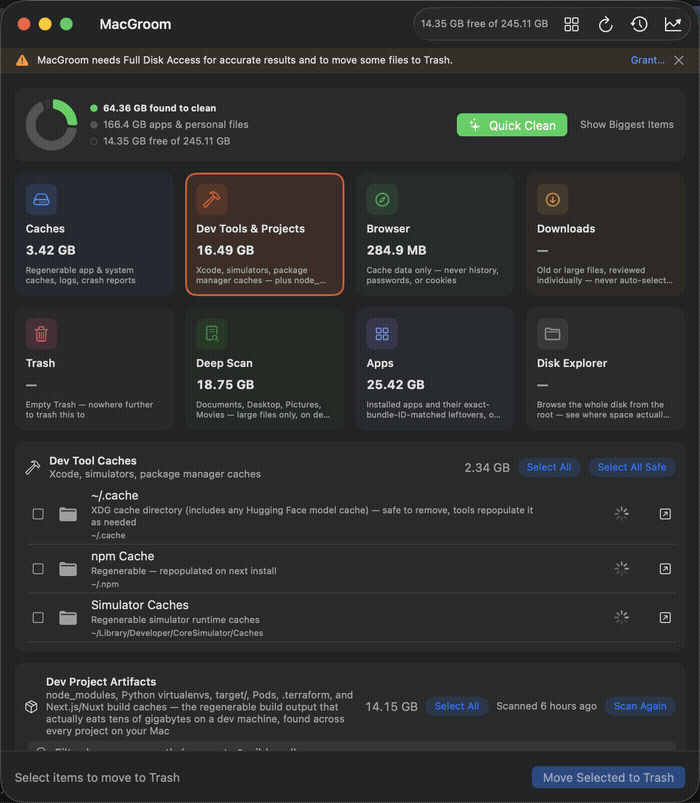
Three categories — the same ones that are free in the GUI app's own free tier:
- Local AI model caches — Ollama (
~/.ollama/models), LM Studio (~/.lmstudio/models), and Hugging Face (~/.cache/huggingface) each keep their own separate copy of the same checkpoint, and none of them clean up after themselves. Comparing even a handful of local models routinely means 50–150GB of duplicate, forgotten weights — the fastest-growing bucket on a 2026 dev machine. - Dev Tool Caches — Xcode DerivedData, Simulator Caches, and npm/Yarn/pnpm/pip/Poetry/Cargo caches.
- Dev Project Artifacts —
node_modules, Python virtualenvs, Rust/Maventarget/, CocoaPodsPods/,.terraform, and Next.js/Nuxt build caches, found recursively across every project under a given path.
Pure Swift, zero third-party dependencies, no telemetry — nothing ever leaves your Mac.
Install
brew install soodrajesh/tap/macgroomOr build from source:
git clone https://github.com/soodrajesh/macgroom-cli.git
cd macgroom-cli
swift build -c release
cp .build/release/macgroom /usr/local/bin/
Usage
# List everything found under $HOME, with sizes — nothing is touched
macgroom scan

# Scope the recursive project scan to a specific directory (faster)
macgroom scan --path ~/Developer

# Machine-readable output
macgroom scan --json

# Interactive: review each item, y/n/a(ll)/q(uit)
macgroom clean

# Non-interactive: trash every safe item without asking
macgroom clean --yes

# See exactly what --yes would do, without doing it
macgroom clean --yes --dry-run

# Also include AI model caches (Ollama/LM Studio/Hugging Face) in
# --yes mode — excluded by default since you may still be using one
macgroom clean --yes --include-review
The safety model
Same principle as the GUI app: every deletion goes through Trash, never rm, and nothing is ever auto-selected that isn't safely regenerable. Dev Tool Caches and Dev Project Artifacts are fully rebuildable by the tool that made them — npm install, cargo build, and so on — so they're marked safe and included by --yes.
Local AI model caches are technically re-downloadable, but you might still be actively using one — so they're always flagged for review (a ! in scan output) and excluded from --yes unless you explicitly pass --include-review. That holds even when Hugging Face's cache is sitting inside the otherwise-safe ~/.cache — the tool checks what's actually in there, not just the parent directory's name.
A model flagged for review isn't a bug to work around with a flag you forget you set. It's the tool declining to guess whether you're still using something.
Relationship to the GUI app
This CLI covers the three categories above — free forever, matching what's free in the MacGroom app's own free tier. It doesn't gate anything; it's a standalone free tool, not a trial for something else. The GUI app additionally covers general System & App Caches, Browser Caches, Downloads, Trash, and an App Cleaner (also free), plus Deep Scan, Storage Trend, and a menu bar widget — those three live behind MacGroom Pro, a one-time $24, if you want a visual dashboard on top of what the CLI already gives you for free.
Free, open source, MIT-licensed. Install it in one line, or read the source before you do.
📢 Have questions or feedback? Drop a comment below or connect with me on Twitter/X@spysood!