MacShelf 1.3 — Free tier available now
Every quick tool you reach for, one menu bar icon.
MacShelf puts live CPU/MEM monitoring, a Calendar, a Calculator, clipboard history, and a scratch Notepad behind a single menu bar icon — five tabs in a fixed-size popover, so switching tabs never resizes the panel on you.
Supersedes three separate menu bar utilities (SysMonitor, the mac-widgets Quick Tools, and ClipKeep) with one app. Free tier is fully useful on its own; MacShelf Pro unlocks Clipboard history, the Notepad, and two global hotkeys.
● Free, no account — macOS 13+, Apple Silicon & Intel.
Why MacShelf exists
Three menu bar utilities, replaced by one
Three separate menu bar utilities, one icon
SysMonitor, mac-widgets' Quick Tools, and ClipKeep each claimed their own menu bar slot. MacShelf replaces all three with five tabs behind one icon.
Switching tabs doesn't resize the window
The five-tab popover is a fixed size — Stats, Calendar, Calculator, Clipboard, and Notepad all render in the same frame, so the popover never jumps around as you switch between them.
⌘⇧V and ⌘⇧N work from any app
A searchable paste picker (⌘⇧V) and a quick Notepad opener (⌘⇧N) stay registered globally — no need to click the menu bar icon first.
Free Up Memory uses the system's own admin sheet
purge requires root, so Free Up Memory goes through macOS's own Touch-ID-or-password admin prompt — works even on managed Macs where custom sudoers rules are blocked.
What to expect
See what it does
Every feature, explained — click around
Five tabs in one fixed-size popover — three free, two behind MacShelf Pro.
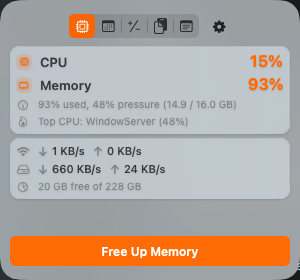
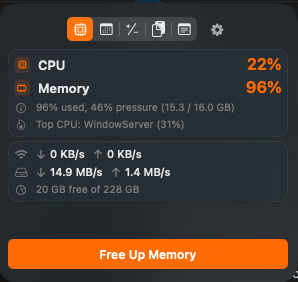
Live system detail, one click away
Right-click the menu bar icon for Free Up Memory, Enable Accessibility (if needed), Settings, and Quit — without opening the popover at all.
- Live two-line CPU % / MEM % readout — turns red under load
- Top CPU process, plus network and disk throughput
- Disk free/total at a glance
- Free Up Memory via macOS's own admin sheet, not a raw
sudoprompt
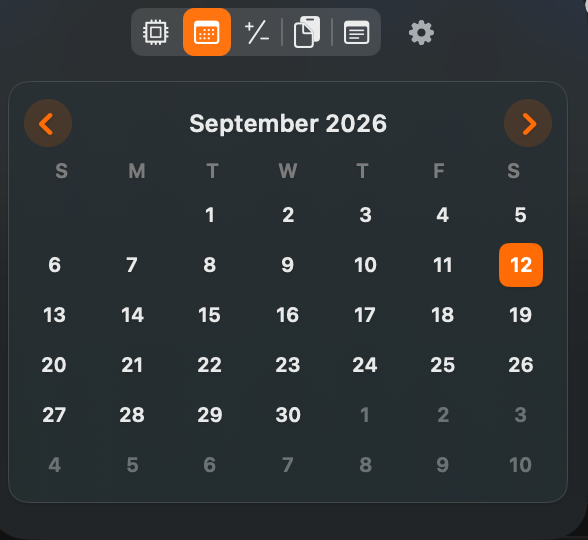
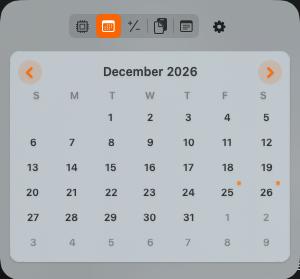
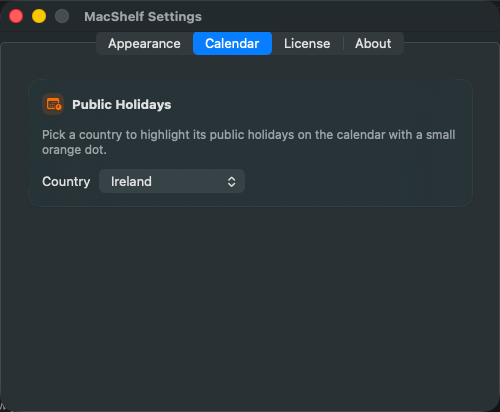
A month grid, with public holidays for any country you pick
A quick-reference calendar without opening a separate Calendar app — useful for checking a date or an upcoming Irish bank holiday mid-task.
- Standard month-grid calendar in the popover
- Pick any country in Settings → Calendar; its public holidays are computed, not hand-maintained
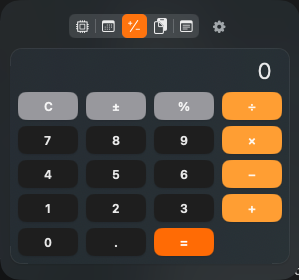
A basic calculator, always one click away
For the quick arithmetic that doesn't warrant switching to Calculator.app and back.
- Four-operation calculator in the same fixed-size popover
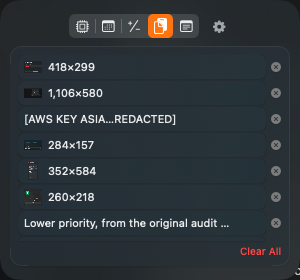
Clipboard history, with a global picker PRO
Ported from ClipKeep — same clipboard history and picker, now inside MacShelf instead of a separate app. Needs its own Accessibility grant even if ClipKeep already had one, since MacShelf uses a new bundle ID.
- Recent copies with image thumbnails, click to copy
- ⌘⇧V opens a floating searchable paste picker from any app — ↑/↓ to browse, Return to paste
- Auto-paste into whichever app had focus, when Accessibility is granted
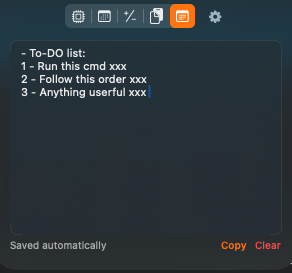
A scratch pad that's always one hotkey away PRO
Saved to ~/Library/Application Support/MacShelf/notepad.txt — a plain text scratch pad for the note you don't want to lose when you close a window.
- ⌘⇧N opens the popover straight to Notepad, from any app
- Debounced auto-save — nothing to remember to save
- Copy and Clear (with confirm) buttons
- Standard editing shortcuts (⌘A/⌘C/⌘X/⌘V/⌘Z) via a hidden Edit menu
How it works
Try it free. Pay once, if Pro is worth it.
1
Use the free tier
Stats, Calendar, and Calculator all do real, useful work for free — no trial timer.
2
Decide if Pro is worth it
Clipboard history, the Notepad, and the two global hotkeys are the only things MacShelf Pro adds.
3
One purchase, done
MacShelf Pro is a one-time $10 purchase via Polar.sh — instant checkout, license key by email.
Pricing
Free forever, or unlock Pro
Free
$0
No trial timer, no nagging — works fully, forever
- Stats — CPU/MEM, top process, network & disk, Free Up Memory
- Calendar — month grid with public holidays for any country you pick
- Calculator — basic four-operation calculator
- Works on any Mac, no account required
MacShelf Pro
$10 one-time
One purchase, yours forever — no subscription
- Everything in Free, plus:
- Clipboard history with image thumbnails
- ⌘⇧V global searchable paste picker, with auto-paste
- Notepad with ⌘⇧N global hotkey and auto-save
- One license, up to 3 Macs
MacShelf Pro is a one-time $10 purchase via Polar.sh — instant checkout, license key emailed immediately.
FAQ
Questions people actually ask
How do I install it?
Download the DMG, open it, and drag MacShelf to Applications. Requires macOS 13 or later; the download is universal (Apple Silicon & Intel).
Is MacShelf Pro available now?
Yes. It's a one-time $10 purchase via Polar.sh — checkout is instant and your license key arrives by email, ready to paste into Settings → License.
Does MacShelf send any of my data anywhere?
No. Everything runs locally — clipboard history, notepad text, and system stats never leave your Mac. The network calls are the one-time Pro license check, a quiet launch-time check for a newer MacShelf version, and, if you pick a country in Settings → Calendar, fetching that country's public holidays.
Do I need to quit ClipKeep, SysMonitor, or Quick Tools first?
Yes — quit them before first launch to avoid duplicate clipboard polling and a ⌘⇧V conflict: pkill -f SysMonitor; pkill -f QuickTools; pkill -f ClipKeep.
Why does Clipboard need its own Accessibility grant?
MacShelf uses a new bundle ID, so a grant made to ClipKeep doesn't carry over automatically. Without it, picking from history still copies to the clipboard — you paste with ⌘V yourself instead of getting auto-paste.
Which Macs does it support?
macOS 13 (Ventura) and later, Apple Silicon and Intel, universal binary — native Swift/AppKit + SwiftUI, no third-party dependencies.
I lost my license key — how do I get it back?
Check your inbox for the receipt email from Polar.sh, sent the moment you bought MacShelf Pro — it has a link to Polar's customer portal, where your key is always available to view again. Can't find that email either? Use the contact form below with the email you paid with and we'll look it up.
How do I report a bug or request a feature?
Open an issue on the GitHub repo, or use the contact form below.
Start with the free tier — Stats, Calendar, Calculator
Download it now, no account needed. Clipboard history and the Notepad are MacShelf Pro — a one-time $10 purchase, unlocked instantly.