MacPeel 1.2 — Free tier available now
Turn any screenshot into text, on-device.
⌘⇧O opens macOS's own region-selection crosshair — the same UI as ⌘⇧4 — then runs on-device text recognition on the capture and copies the result straight to your clipboard. No windows, no popups to dismiss.
OCR runs entirely on-device via Apple's Vision framework, in both tiers — nothing about recognition quality changes with the license. Free tier includes 20 operations a day; MacPeel Pro removes the cap and adds power-user features.
● Free, no account — macOS 13+, Apple Silicon & Intel.
Why MacPeel exists
Screenshot text, without the copy-paste-app dance
⌘⇧O, select, done
The same region-selection crosshair as ⌘⇧4, then on-device OCR runs automatically and the result lands on your clipboard — no separate app to open.
Nothing you capture is ever uploaded
Recognition uses Apple's Vision framework in .accurate mode with language correction — slower than .fast but noticeably better on UI text, code, and mixed fonts.
Not just fresh captures
Choose Image… runs the same OCR on an existing image file (PNG, JPG, etc.) via a standard file picker — for text in screenshots or photos you already have saved.
Esc leaves nothing behind
Esc during selection cancels cleanly — nothing is copied, nothing is left on disk. The capture itself is a temp file, deleted immediately after OCR.
What to expect
See what it does
Every feature, explained — click around
Two capture modes free with a daily cap — three power features behind MacPeel Pro.
One shortcut, from anywhere
The capture shortcut is registered globally via Carbon's Event Manager — if another app already claims that combination, registration silently fails to bind, so check Settings if ⌘⇧O doesn't respond.
- ⌘⇧O (or the menu) opens the same crosshair UI as ⌘⇧4
- On-device text recognition runs automatically on the capture
- Result copies straight to the clipboard — no window to dismiss
- Menu bar icon flashes ✓ on success, ? if no text was found
OCR for screenshots and photos you already have
For text that's already sitting in a saved image rather than something you're about to capture fresh.
- Standard file picker — PNG, JPG, and other common formats
- Same on-device Vision pipeline as a fresh capture
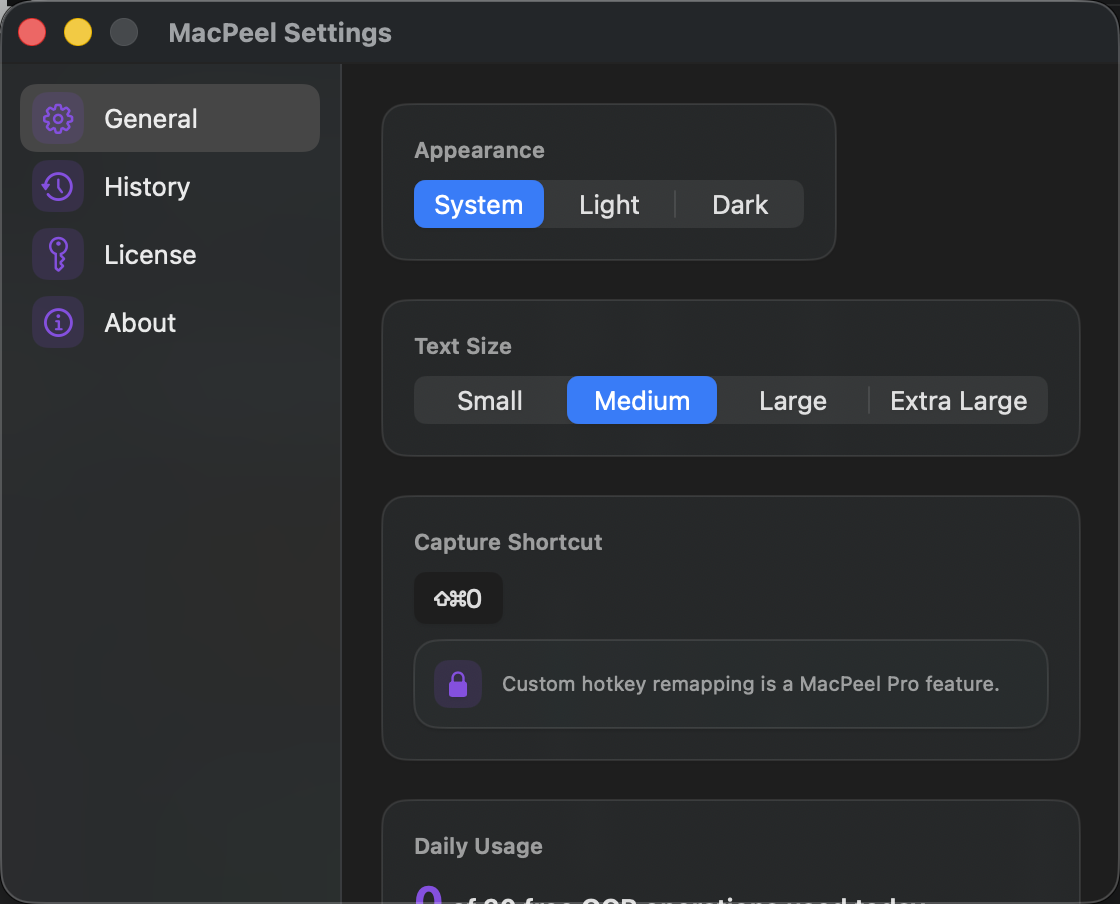
A fair daily cap, or none at all PRO
Both tiers run the identical on-device recognizer — the cap is purely a usage limit, never a quality difference.
- Free: 20 OCR operations a day, resetting at local midnight
- Pro PRO: unlimited operations
- A clear "Unlock Pro" notification (and a lock icon) shows when the cap is hit — never a silent failure
Batch OCR and a searchable history PRO
For anyone running OCR often enough that the one-at-a-time free flow starts to feel slow.
- Batch OCR — select multiple images at once
- OCR history log — recent results, copyable
- Custom hotkey remapping (default stays ⌘⇧O)
How it works
Try it free. Pay once, if Pro is worth it.
1
Use the free tier
Region-capture and Choose Image OCR both work fully, free, 20 operations a day.
2
Decide if Pro is worth it
Unlimited operations, batch OCR, history, and custom hotkeys are the only things MacPeel Pro adds.
3
One purchase, done
MacPeel Pro is a one-time $10 purchase via Polar.sh — instant checkout, license key by email.
Pricing
Free forever, or unlock Pro
Free
$0
No trial timer, no nagging — works fully, forever
- Region-capture OCR (⌘⇧O)
- Choose Image OCR
- 20 operations/day, resets at local midnight
- Works on any Mac, no account required
MacPeel Pro
$10 one-time
One purchase, yours forever — no subscription
- Everything in Free, plus:
- Unlimited daily OCR operations
- Batch OCR — select multiple images at once
- OCR history log (recent results, copyable)
- Custom hotkey remapping
- One license, up to 3 Macs
MacPeel Pro is a one-time $10 purchase via Polar.sh — instant checkout, license key emailed immediately.
FAQ
Questions people actually ask
How do I install it?
git clone the repo, run ./build.sh, then open MacPeel.app from /Applications. Requires the Xcode Command Line Tools.
What permission does it need?
Screen Recording — macOS attributes this to whichever app invokes screencapture, even as a subprocess. Grant it in System Settings → Privacy & Security → Screen Recording. If it stops working after a rebuild, toggle the grant off and back on.
Is MacPeel Pro available now?
Yes. It's a one-time $10 purchase via Polar.sh — checkout is instant and your license key arrives by email, ready to paste into Settings → License.
Does MacPeel send any of my data anywhere?
No — OCR runs entirely on-device via Apple's Vision framework. Nothing you capture or choose is ever uploaded.
Which Macs does it support?
macOS 13+, native Swift/AppKit + SwiftUI, no third-party dependencies.
I lost my license key — how do I get it back?
Check your inbox for the receipt email from Polar.sh, sent the moment you bought MacPeel Pro — it has a link to Polar's customer portal, where your key is always available to view again. Can't find that email either? Use the contact form below with the email you paid with and we'll look it up.
How do I report a bug or request a feature?
Open an issue on the GitHub repo, or use the contact form below.
Start with the free tier — 20 OCR operations a day
Download it now, no account needed. Unlimited operations, batch OCR, and history are MacPeel Pro — a one-time $10 purchase, unlocked instantly.