MacHub 1.4 — Free tier available now
The PDF & image toolkit that doesn't nag you for every little thing.
Compress, merge and split PDFs, rotate/delete/extract pages, do a basic image crop/rotate/resize, organize pages, sign a PDF, read barcodes, run OCR, or transcribe audio and video — all free, forever. MacHub Pro adds the batch and power-user tools on top.
Offline and private for every tool except Video Downloader (which fetches what you ask it to, by design). Deliberately the largest free tier in the mac-apps line — and, deliberately, the largest Pro tier too.
● Free, no account — macOS 13+, Apple Silicon & Intel.
Why MacHub exists
One app instead of five single-purpose tools
Compress, Merge, Split — no trial, no watermark
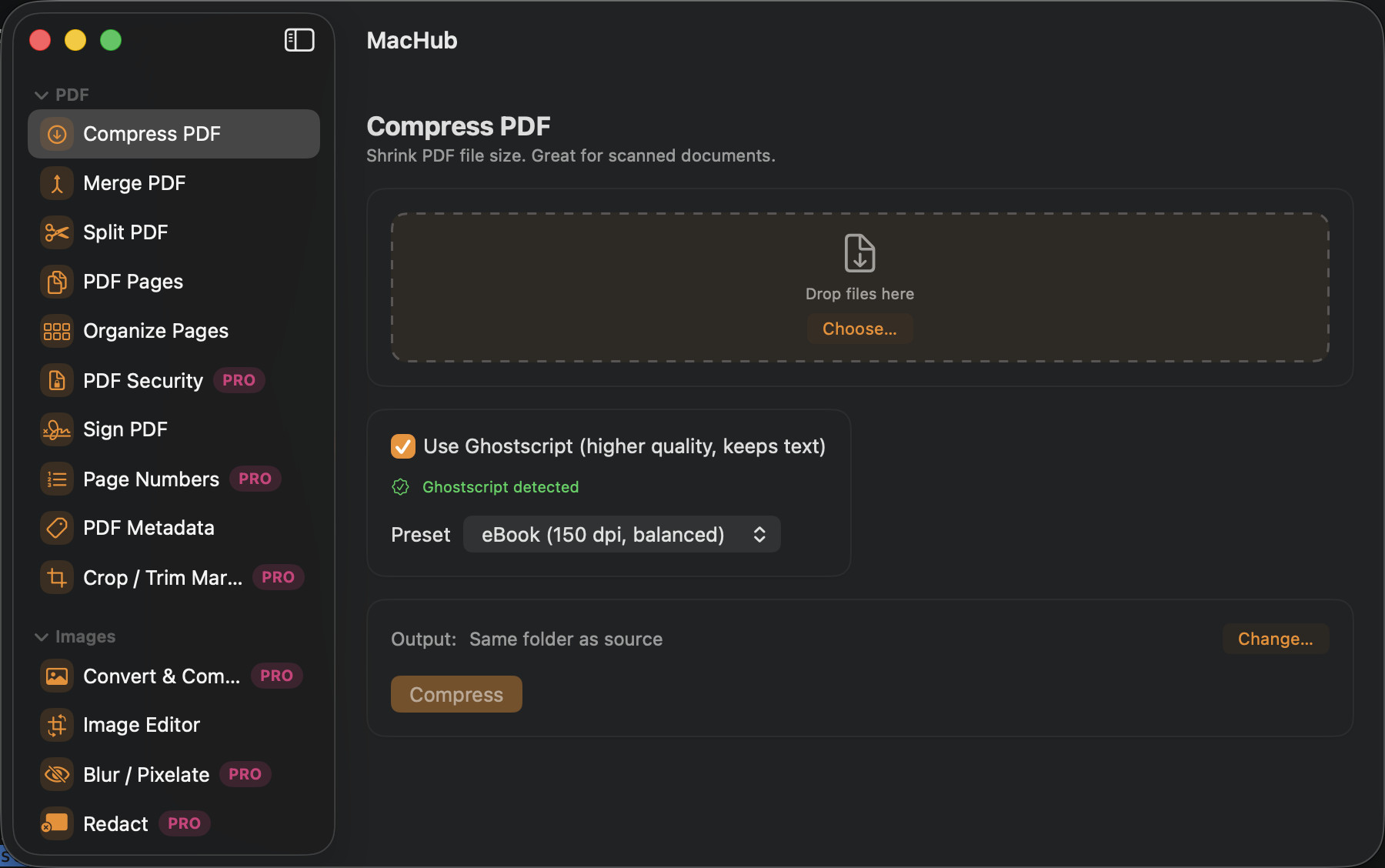
Native, no-install compression (pages with real selectable text are left untouched; only scanned/photo pages are rasterized and recompressed), reordering by drag or arrows for Merge, and page-range splitting — all free.
Crop, rotate, flip, resize — one file at a time
Draggable-handle cropping, rotate, flip, and Paint-style resize/skew with a live selection + output-size readout.
Every tool except Video Downloader stays on-device
OCR, Redact, Blur/Pixelate, Transcribe, and Remove Background all run locally via Vision/Speech frameworks — nothing uploaded.
It fetches what you ask it to, on purpose
Video Downloader reaches the network — by design, since the whole point is fetching a video you gave it a URL for. Convert & Compress Video stays local; it just shells out to the bundled ffmpeg for codecs AVFoundation can't handle.
What to expect
See what it does
Every feature, explained — click around
A sidebar full of tools — most free, the batch and power-user ones behind MacHub Pro.
The core PDF workflow, entirely free
The largest free tier in the mac-apps line — most of what you'd reach for day to day costs nothing.
- Compress PDF — native, no-install: pages with real selectable text are left untouched, scanned/photo pages are rasterized and recompressed at a chosen DPI/quality
- Merge PDF — combine files, reorder by drag or arrows
- Split PDF — one file per page, or by page ranges
- PDF Pages — rotate, delete, extract; PDF ↔ images
- Organize Pages, Sign PDF, PDF Metadata, Barcode/QR, OCR/Text — all free too
Basic editing free, batch tools PRO
Single-image editing is free and unlimited; the batch tools — the ones that save real time across many files at once — are MacHub Pro.
- Free: crop with draggable handles, rotate, flip, resize/skew (one image at a time)
- Pro PRO: Convert & Compress (batch format/quality), Watermark (batch), Crop/Trim Margins (batch), Remove Background†, Collage, Icon Generator
† Remove Background needs macOS 14+ (Vision's subject-lifting API); everything else on this page works on macOS 13+.
Permanent redaction and face-aware blurring PRO
These run entirely on-device via Vision, same as the free tools — Pro-gated for the workflow value, not for privacy.
- Redact — permanently blacks out regions in a PDF or image; content underneath is destroyed, not covered
- Blur / Pixelate — drag to hide regions, or auto-detect faces (Vision)
- PDF Security — add/remove password, diagonal watermark
A full audio/video toolkit, mostly free
Transcribe refuses to fall back to a server-based recognizer if on-device recognition isn't available — it never sends audio anywhere, full stop.
- Transcribe (free) — on-device Speech framework, English (US/UK/India), outputs .txt and optional .srt
- Convert & Compress Video, Extract Audio, Trim/Merge/Loop Audio — free
- Video Downloader (free, yt-dlp + ffmpeg bundled inside the app) — the one tool that reaches the network by design
How it works
Try the free tools. Pay once, if Pro is worth it.
1
Use the free tier
Compress/Merge/Split PDF, PDF Pages, basic image edit, OCR, Transcribe, and more all work free, forever.
2
Decide if Pro is worth it
Batch conversion, Watermark, Redact, Remove Background, Collage, Icon Generator, and more are the only things MacHub Pro adds.
3
One purchase, done
MacHub Pro is a one-time $25 purchase via Polar.sh — instant checkout, license key by email.
Pricing
Free forever, or unlock Pro
Free
$0
No trial timer, no nagging — works fully, forever
- Compress, Merge, Split PDF; PDF Pages
- Organize Pages, Sign PDF, Metadata, Barcode/QR, OCR
- Basic single-image edit (crop/rotate/flip/resize)
- Transcribe, Convert/Extract/Trim/Merge/Loop audio & video, Video Downloader
MacHub Pro
$25 one-time
One purchase, yours forever — no subscription
- Everything in Free, plus:
- Convert & Compress (batch images), Watermark (batch)
- Crop/Trim Margins (batch), Redact, Remove Background
- Collage, Icon Generator, PDF Security, Page Numbers
- Blur/Pixelate with auto-detect faces
- One license, up to 3 Macs
MacHub Pro is a one-time $25 purchase via Polar.sh — instant checkout, license key emailed immediately.
FAQ
Questions people actually ask
How do I install it?
Run ./build.sh, then open MacHub.app from /Applications, or launch it from Launchpad/Spotlight. Requires macOS 13+ and the Swift toolchain.
Do I need Ghostscript, yt-dlp, or ffmpeg?
No. Compress PDF is entirely native — no Ghostscript, no install, ever. yt-dlp and ffmpeg (needed for Video Downloader and Convert & Compress Video's fallback path) ship bundled inside the app itself, so there's nothing to install for those either.
Is MacHub Pro available now?
Yes. It's a one-time $25 purchase via Polar.sh — checkout is instant and your license key arrives by email, ready to paste into Settings → License.
Does MacHub send my files anywhere?
No — only Video Downloader reaches the network, by design. Convert & Compress Video's ffmpeg fallback runs locally (no network); every other tool runs entirely on-device too.
Is a locked Pro tool hidden?
No — opening a Pro tool from the sidebar (marked with a PRO badge) shows exactly what it does and an "Unlock Pro" upsell, never a dead end.
Which Macs does it support?
macOS 13+ with the Swift toolchain to build; native Swift + SwiftUI, no Xcode project.
I lost my license key — how do I get it back?
Check your inbox for the receipt email from Polar.sh, sent the moment you bought MacHub Pro — it has a link to Polar's customer portal, where your key is always available to view again. Can't find that email either? Use the contact form below with the email you paid with and we'll look it up.
How do I report a bug or request a feature?
Open an issue on the GitHub repo, or use the contact form below.
Start with the free tier — most of the toolkit is free
Download it now, no account needed. Batch conversion, Watermark, Redact, and more are MacHub Pro — a one-time $25 purchase, unlocked instantly.