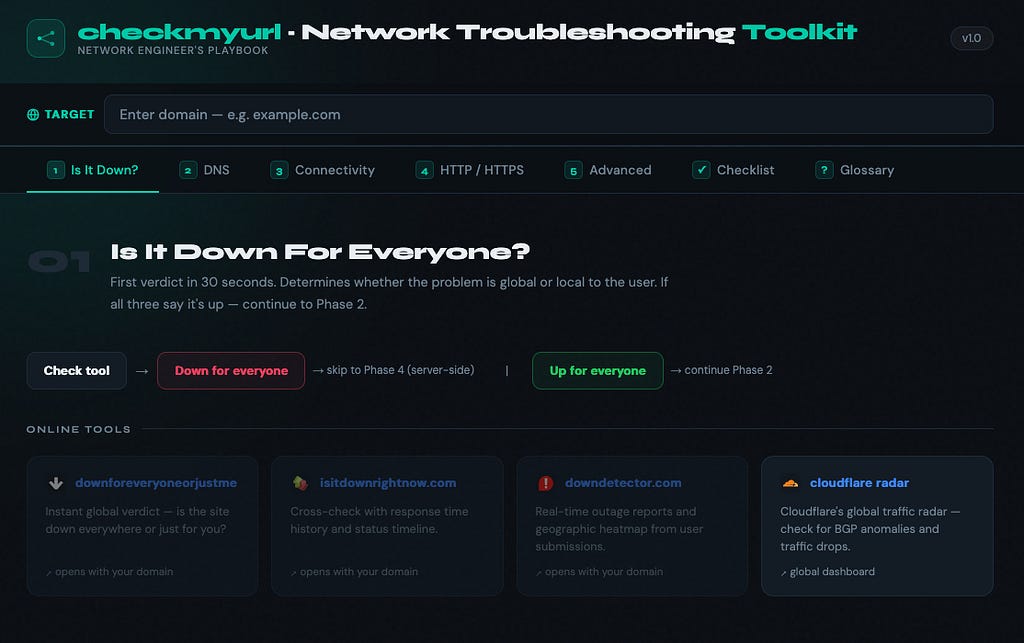
I’ve been in networking and DevOps long enough to know one thing:
When something breaks at 2am, the last thing you want is six tabs open trying to figure out whether it’s DNS, SSL, or the site just being… down.
That was the motivation.
I already had a mental playbook — a sequence of checks I’d run every time someone said “the website is down”:
- DNS first
- Then connectivity
- Then HTTP
- Then edge cases
After doing this manually for the hundredth time, the obvious question hit me:
Why isn’t this just one tool?
So I built it.
checkmyurl → https://irajeshsood.com/checkmyurl/
Free. No signup. Runs entirely in the browser. No backend.
What It Actually Does
You enter a domain and hit Run Checks.
It fires off ~a dozen checks in parallel and returns a consolidated result with:
- ✅ Pass
- ⚠️ Warning
- ℹ️ Info
Plus a summary: X passed, X warnings, X info.
You can filter results instantly by clicking the status pills.
Checks Included
- DNS records — A, AAAA, CNAME, MX, NS, TXT, CAA, PTR
- SSL certificate expiry + issuer
- WHOIS / RDAP — registrar, domain age, expiry
- SPF, DMARC, DKIM
- DNSSEC validation
- CDN detection — Cloudflare, Vercel, Netlify, AWS, Fastly
- Blacklist / RBL checks — Spamhaus, SpamCop, SORBS, Barracuda
- HTTP + HTTPS reachability
- ASN + hosting provider per IP
- Reverse DNS (PTR)
- Resolver comparison:
- Google (8.8.8.8)
- Cloudflare (1.1.1.1)
- www vs apex comparison
Results come back in a few seconds.
The “No Backend” Constraint (Intentional)
This wasn’t an accident.
I deliberately chose:
- No backend
- No infra
- No maintenance
Which forces a more interesting question:
What can you realistically do from just a browser?
Turns out — quite a lot.
How I Worked Around Browser Limitations
DNS Queries
Browsers don’t support raw DNS.
Solution:
- Use DNS-over-HTTPS (DoH)
- Google + Cloudflare both expose JSON APIs
dohQuery('example.com', 'A')→ becomes a simple fetch call.
HTTP Reachability
CORS blocks access to response details.
Workaround:
fetch(url, { mode: 'no-cors' })- If it resolves → host responded
- If it throws → host didn’t
You don’t get status codes — but for reachability, that’s enough.
SSL Certificates
No TLS handshake access in browser.
Solution:
- Use certificate transparency logs via crt.sh
crt.sh/?q=domain&output=json→ returns:
- expiry
- issuer
- history
WHOIS / RDAP
Used public RDAP API:
- registrar
- creation date
- expiry
- domain status
All fetchable client-side.
Blacklist (RBL) Checks
Normally done via DNS:
1.2.3.4 → 4.3.2.1.zen.spamhaus.orgWith DoH:
→ same lookup
→ just over HTTPS
No backend required.
ASN Lookups
Used ipapi.co:
- ASN
- org
- location
~2 API calls per run.
The Part That Actually Matters: Context-Aware Checks
The first version was… noisy.
Technically correct, but useless:
- Missing SPF warnings on domains that don’t send email
- DNSSEC warnings on Cloudflare-proxied domains
- RDAP failures on unsupported TLDs
Classic “tool that cries wolf.”
The Fix: Context Object
const ctx = {
  isPlatform: isPlatformSubdomain(d),
  isCFProxied: aRecords.some(ip => isCloudflareIP(ip)),
  hasMX: mxRecords.length > 0,
  noRdap: CCTLD_NO_RDAP.has(tld(d)),
};
Then every check becomes conditional.
Examples
- No MX records?
→ Skip SPF/DMARC/DKIM entirely - Cloudflare proxied?
→ DNSSEC warnings suppressed - .io / .ai domains?
→ RDAP failures ignored - Platform subdomains (Vercel/Netlify)?
→ Redirect-related noise ignored
Result
Less noise. More signal.
This is the difference between:
- a tool that looks impressive
- and one you actually trust at 2am
The Most Useful Feature: Resolver Comparison
This one punches above its weight.
The tool queries:
- Google DNS (8.8.8.8)
- Cloudflare DNS (1.1.1.1)
Then compares results.
What It Detects
Case 1 — Different subnets
→ Likely:
- split-horizon DNS
- propagation issue
Case 2 — Same /24 subnet
→ Likely:
- CDN anycast
→ Marked as info, not warning
Real-World Impact
This catches issues like:
“We updated DNS but some users still see the old IP.”
Usually:
- old provider still authoritative
- resolver inconsistency
These can persist for days.
What It Can’t Do
Let’s be honest:
- No raw socket checks (SMTP, MySQL, etc.)
- No full TLS inspection (cipher suites, HSTS)
- No traceroute (ICMP not available)
- HTTP is opaque (no headers/status)
- Dependent on third-party API limits
Workaround for Limitations
Instead of forcing hacks:
I added a manual playbook:
- SSL Labs
- MXToolbox
- bgp.he.net
All pre-filled with your domain.
What I’d Add Next
A few ideas:
- Port scanning via WebSockets (limited, but doable)
- SMTP banner check via a tiny serverless function
- Saved history (localStorage)
- Shareable result URLs
Try It
👉 https://irajeshsood.com/checkmyurl/
Works on mobile too.
Feedback Welcome
If you find:
- false positives
- missing checks
- unknown DNS providers
Let me know.
Recent example:
Hetzner nameservers (helium, oxygen, etc.) — added after user feedback.
There are probably more gaps.
Final Thought
No grand conclusion.
Just a tool I built because I got tired of opening six tabs every time something broke.
Tags: networking, DNS, devops, sysadmin, webdev, tools
📢 Have questions or feedback? Drop a comment below or connect with me on Twitter/X@spysood!
Originally published on Medium.