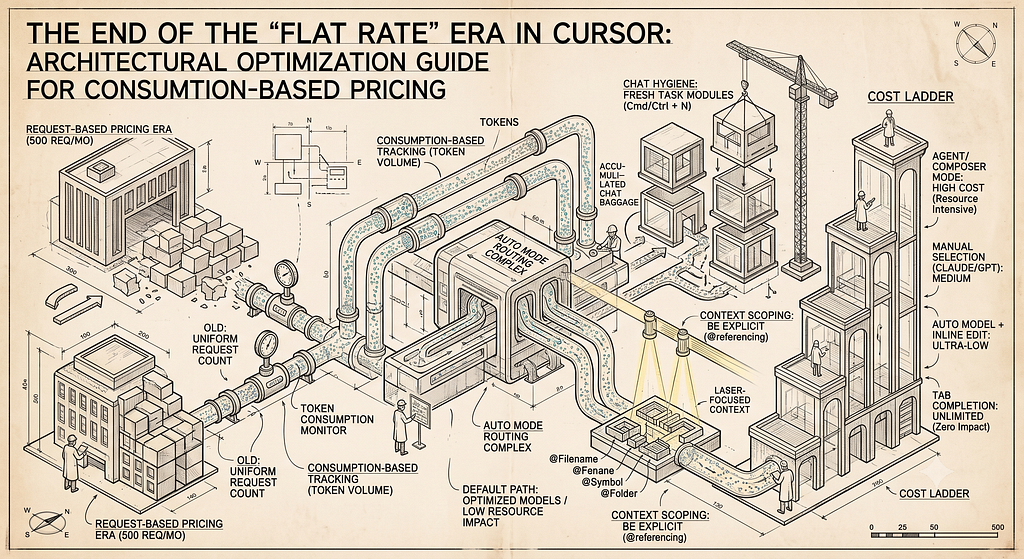
If you log into Cursor soon, you are going to notice a massive shift under the hood. The days of a flat, predictable “x requests per month” are officially behind us. We are now entering the era of consumption-based pricing.
What does this mean for your daily workflow? Previously, asking an AI agent to read your entire repository cost the exact same “1 request” as asking it to fix a typo in a single line. Under a token-budget model, that math changes radically. Cursor now measures the actual volume of data (tokens) the AI has to read and write.
The Golden Rule: You must shift your mindset from counting actions (how many times you press enter) to minimizing data (how much context you feed the AI).
Don’t panic — premium AI usage isn’t suddenly going to bankrupt you. Standard tab autocompletes are still unlimited. But if you want to stretch your monthly token budget to its absolute limit, you need to play smart.
Here is the 4-step playbook for thriving in the new Cursor ecosystem.
1. Make “Auto” Mode Your Default Setting
We all love the sheer horsepower of frontier models like Claude 3.5 Sonnet or GPT-4o. But using them for every single trivial refactor is like taking a Ferrari to the grocery store — it burns fuel incredibly fast.
Cursor’s Auto mode is designed to route requests through highly optimized models that are excluded from draining your premium credit pool at full price. Keep your model selector firmly set to Auto for 90% of your daily driving. Reserve the heavy hitters specifically for when Auto mode genuinely gets stuck on complex, abstract logic.
2. Practice Rigid “Chat Hygiene”
Large Language Models are memoryless. To maintain the illusion of a continuous conversation, Cursor has to resend your entire chat history with every single new prompt you type.
If you keep one chat window open all day, a quick question at 4:00 PM carries the accumulated token baggage of the last six hours of work. It will cost you exponentially more than it should.
The Reset Habit
- The Shortcut: Treat the New Chat button (Cmd/Ctrl + N) like a nervous tic. Open a fresh chat for every single new task.
- The Pivot: If a task is running long and you need to pivot, ask the AI: “Summarize our code changes and decisions so far.” Copy that summary, open a new chat, paste it, and keep moving.
3. Stop the Global Scans: Be Explicit
Vague prompts are the absolute enemy of token efficiency. A prompt like “Fix the bug in my auth flow” forces the AI to speculatively scan your workspace, burning through thousands of tokens just trying to find where the problem lives.
Instead, never let the AI guess. Use Cursor’s @ referencing ruthlessly to trim the fat:
- @Filename: Point exactly to the code you want modified.
- @Symbol: Pinpoint a specific function or class.
- @Folder: Restrict the AI's search to a single directory.
Pro Tip: Keep your files modular. Feeding the AI a tight, well-organized 150-line file costs a fraction of the tokens required to process a 1,000-line monolithic file.
4. Tier Your Tool Usage
Not all features in Cursor consume tokens equally. Think of your tools as a cost ladder, and choose the lowest rung necessary to get the job done:
The Cursor Cost Ladder (Tool Tier Breakdown)
Feature / Mode                   | Budget Impact | Best Use Case
------------------------------------------------------------------------------------------------------
Tab Completion                   | Unlimited     | Keep enabled all day. Your frictionless pair programmer.
Auto Model + Inline Edit         | Ultra-Low     | Your default daily driver for routine refactors.
Manual Selection (Claude/GPT)    | Medium        | Hard algorithmic problems or tricky debugging.
Agent / Composer Mode            | High Cost     | Major architectural shifts. Use sparingly.
Frequently Asked Questions (FAQ)
Q: What is the main difference between the old model and the new one?
A: Previously, your usage was measured purely by the number of individual requests you made, meaning a one-line fix and a massive codebase scan cost the exact same “1 request”. Under the new model, usage is measured by token volume — meaning you are billed for the actual amount of data the AI reads and writes.
Q: Is standard code autocomplete (Tab Completion) going to drain my budget?
A: No. Standard background tab completions remain completely unlimited and do not consume your premium token budget. You can leave it running all day without worrying about costs.
Q: What exactly is “Auto Mode” and why is it recommended as the default? A: Auto mode is a smart routing feature in Cursor that automatically sends routine coding tasks to highly efficient, optimized models. Because these routing paths are optimized, using Auto mode prevents your prompts from eating into your premium frontier model credit budget at full price.
Q: Why does keeping a single chat window open all day burn through tokens?
A: AI models are memoryless, so Cursor must resend your entire active chat history back to the AI every single time you submit a new prompt. If a chat window accumulates hours of code and discussion, a tiny question at the end of the day will cost exponentially more tokens than it would in a fresh chat.
Q: How do the @ symbols help me save money?
A: Vague prompts force Cursor to speculatively scan large portions of your workspace to find relevant files, which consumes a massive amount of tokens. Using explicit references like @Filename, @Symbol, or @Folder forces the AI to look only at the exact code you specify, keeping your token consumption minimal.
Q: What happens if I completely run out of my monthly token budget?
A: Once you exhaust your included monthly credit budget, you will hit a cap on premium models. To continue using heavy frontier models (like Claude or GPT) for the remainder of the month, you will either need to pay for on-demand overages on a pay-as-you-go basis or upgrade your plan tier.
The Takeaway
Consumption pricing doesn’t mean you have to stop using AI; it just means you have to start managing it. By keeping your context tight, refreshing your chats, and leaning heavily on Auto mode, you will likely find that your new token budget lasts significantly longer than the old flat limits ever did.
Happy coding.
📢 Have questions or feedback? Drop a comment below or connect with me on Twitter/X@spysood!
Originally published on Medium.