Hey everyone, Happy Sunday!
If you’re into machine learning and cloud stuff like me, you’ve probably spent many hours:
- Manually spinning up AWS resources
- Debugging Docker builds
- Wrestling with SageMaker notebooks
…just to train a simple model. I’ve been there.
That’s why I built the AWS-SageMaker-MLOps-Pipeline project on GitHub:
👉 https://github.com/soodrajesh/AWS-Sagemaker-MLOps-Pipeline
It automates the whole workflow for training models on the classic MNIST dataset using SageMaker. Think of it as a no-fuss MLOps setup that’s fun to tinker with and stays within AWS’s free tier (no surprise bills).
In this post, I’ll walk you through:
- Deploying infrastructure with Terraform
- Containerizing a custom PyTorch model with Docker
- Training with both XGBoost and PyTorch
- Monitoring results
- Cleaning up safely
By the end, you’ll have a working end-to-end pipeline you can tweak for your own projects.
Why Bother? (Quick Backstory)
A couple of months ago, I was knee-deep in a side project trying to compare built-in SageMaker algorithms (like XGBoost) against custom ones (PyTorch neural nets) on MNIST — the handwritten digits dataset that’s basically ML’s “hello world.” But setting it up every time was a pain: manual IAM roles, S3 buckets that clashed with existing ones, Docker images that wouldn’t push to ECR… you get it.
So, I scripted the hell out of it with Terraform for IaC and shell scripts for automation. The result? A pipeline that deploys everything in minutes, trains models, and cleans up without me lifting a finger.
But setup was painful:
- IAM roles, S3 bucket naming conflicts
- ECR images refusing to push
- Terraform drift headaches
So, I automated everything with Terraform + shell scripts.
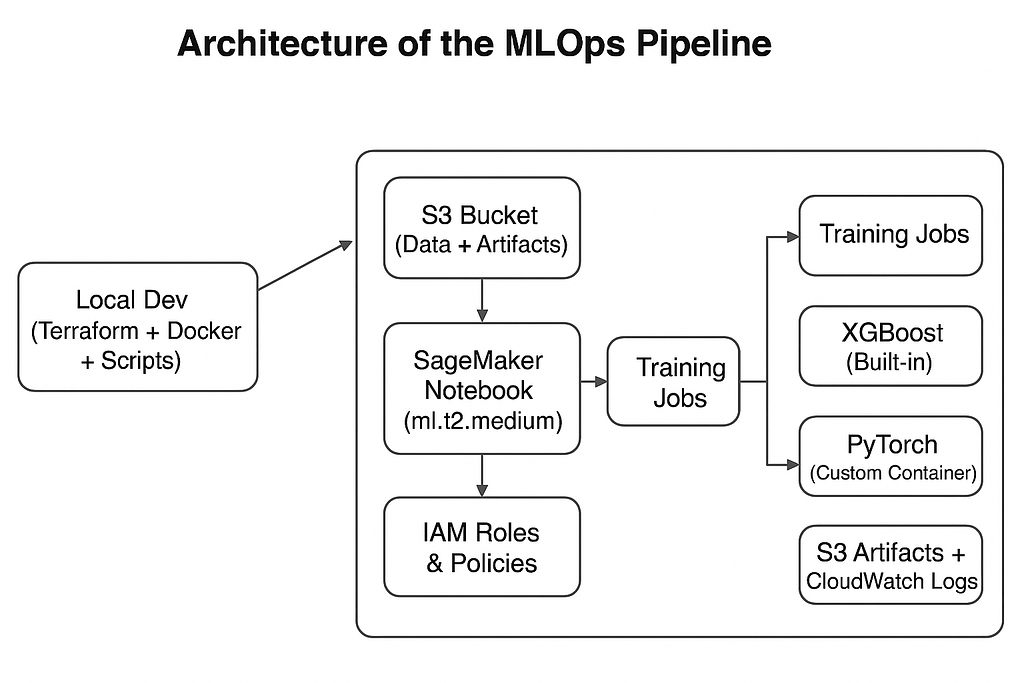
The result: a pipeline that:
Local Dev → Terraform/Docker/Scripts
         → AWS (SageMaker, S3, ECR, IAM)
         → Training (XGBoost/PyTorch)
         → S3 Artifacts + CloudWatch Logs
It supports both frameworks, runs on free-tier-friendly instances like ml.t2.medium, and even includes hyperparameter tuning to squeeze out better accuracy. On my runs, XGBoost hit about 93.68% accuracy in under 15 minutes. Not bad for a PoC!
What You’ll Need
- AWS Account (free tier eligible)
- Tools:
AWS CLI v2
Terraform ≥ 1.3
Docker
Python 3.8+
Git
👉 Pro tip:
aws configure --profile raj-private
aws sts get-caller-identity --profile raj-private
Pro tip: Run “aws configure — profile raj-private” and set your region to “eu-west-1”. Test with “aws sts get-caller-identity — profile raj-private” to make sure it’s good.
Step 1: Clone the Repo
git clone https://github.com/soodrajesh/AWS-Sagemaker-MLOps-Pipeline.git
cd AWS-Sagemaker-MLOps-Pipeline/sagemaker
Directory structure:
The structure is clean — no sprawling monorepo nightmare.
I love how modular it is. The deploy_and_train.sh is your best friend for automation, but if you want to go manual (for learning or debugging), hit the scripts folder. Here’s what you’ll see
sagemaker/
├── main.tf              # Terraform infra
├── variables.tf
├── outputs.tf
├── provider.tf
├── Dockerfile           # PyTorch container
├── train_pytorch.py     # CNN training script
├── train_xgboost.py     # XGBoost training script
├── deploy_and_train.sh  # One-click pipeline
└── scripts/             # Helpers
Step 2: Deploy Infrastructure
Terraform is the hero here — it provisions everything idempotently, so you can apply and destroy without drama. The config sets up:
- A SageMaker notebook instance (ml.t2.medium — free tier friendly).
- An S3 bucket (sagemaker-mnist-data-* with random suffix to avoid naming clashes).
- An ECR repo for Docker images.
- An IAM role with just enough perms (S3, ECR, SageMaker — nothing wild).
Run this in the sagemaker dir:
terraform init
terraform plan
terraform apply
This provisions:
- SageMaker notebook (ml.t2.medium)
- S3 bucket (sagemaker-mnist-data-*)
- ECR repo for Docker images
- Minimal IAM role
Outputs include bucket name + ECR URI — keep them handy.
Step 3: Prep Data & Build Docker
MNIST is tiny (60k training images), so data prep is quick. The prepare_data.sh script downloads it, preprocesses with NumPy/Torchvision, and uploads to S3.
Run it like:
./scripts/prepare_data.sh#!/bin/bash
BUCKET=$(terraform output -raw s3_bucket_name)
python -c "
from torchvision import datasets
import sagemaker
sess = sagemaker.Session()
# Download and upload to S3...
datasets.MNIST('.', train=True, download=True)
# ... (full code in repo)
sess.upload_data(path='mnist_data/', bucket='$BUCKET', key_prefix='mnist/train')
"Now, for the custom PyTorch model: We build a Docker image with a simple CNN (two conv layers, dropout, etc.) in train_pytorch.py. It’s tailored for SageMaker — uses env vars like SM_MODEL_DIR for saving artifacts.
Build and push PyTorch container:
./scripts/build_and_push_docker.shSnippet from that script:
#!/bin/bash
ECR_URI=$(terraform output -raw ecr_repository_uri)
aws ecr get-login-password --region eu-west-1 | docker login --username AWS --password-stdin $ECR_URI
docker build -t pytorch-mnist .
docker tag pytorch-mnist:latest $ECR_URI:latest
docker push $ECR_URI:latest
Sample Dockerfile:
FROM python:3.8
RUN pip install torch==1.9.0 torchvision==0.10.0 sagemaker-training
COPY train_pytorch.py /opt/ml/code/train.py
ENV SAGEMAKER_PROGRAM train.py
Step 4: Train Models
Now, the meat: Training. The train_models.sh script kicks off both XGBoost (built-in) and PyTorch (custom container).
./scripts/train_models.sh- For XGBoost, it uses SageMaker’s estimator on ml.m5.large (still cheap/free-ish for short runs). Hyperparam tuning? Yeah, it tunes max_depth, eta, etc., with 3 jobs max to stay lean.
- From train_xgboost.py (key snippet):
from sagemaker.xgboost import XGBoost
from sagemaker.tuner import HyperparameterTuner

xgboost = XGBoost(
    entry_point='train_xgboost_sagemaker.py',
    role=role,
    instance_type='ml.m5.large',
    framework_version='1.7-1',
    # ... fit on S3 paths
)
tuner = HyperparameterTuner(xgboost, 'validation:accuracy', hyperparameter_ranges, max_jobs=3)
tuner.fit({'train': train_input, 'validation': validation_input})
PyTorch is similar but points to your ECR image:
from sagemaker.pytorch import PyTorch
pytorch = PyTorch(
    entry_point='train_pytorch.py',
    image_uri=ecr_image,
    instance_type='ml.m5.large',
    framework_version='1.9.0',
    # ... same tuning setup
)
Step 5: Monitor & Clean Up
Check training jobs in SageMaker Console or via Python:
import pandas as pd
tuner_xgb = sagemaker.HyperparameterTuner.attach('your-xgb-tuning-job')
df_xgb = tuner_xgb.analytics().dataframe()
print("Best XGBoost Acc:", df_xgb['FinalObjectiveValue'].max())
# Same for PyTorch
Clean up resources:
./scripts/cleanup.sh
# or
terraform destroy
Keeps you within free tier limits.
Troubleshooting Tips
- Terraform lock errors? → terraform refresh
- ECR push fails? → Check IAM role for ecr:BatchGetImage
- S3 access denied? → Role trust policy for sagemaker.amazonaws.com
- Bucket name clash? → Terraform auto-appends suffix
For more, peek at AUTOMATION.md in the repo.
FAQs
Q: Is this really free tier compliant? A: Yep, as long as you stick to ml.t2.medium for notebooks (50 hours/month), short training runs, and clean up. S3/ECR usage is minimal. I clocked under $0.50 for a full run, but monitor your billing dashboard.
Q: Can I swap regions or instance types? A: Totally — edit variables.tf and provider.tf. Just watch free tier limits (e.g., ml.t3.medium also works in some regions).
Q: What if I’m not comfy with shell scripts? A: Run manual steps from the README. Or fork the repo and add your twists, like integrating with GitHub Actions for CI/CD.
Q: PyTorch vs. XGBoost — which wins on MNIST? A: XGBoost is faster and simpler for tabular data like flattened MNIST, but PyTorch shines if you want deep learning tweaks. Both get ~93–95% here.
Q: How do I extend this for my dataset? A: Swap MNIST in prepare_data.sh with your data loader. Update S3 paths in training scripts. Easy peasy.
Wrapping Up
There you have it — a battle-tested MLOps pipeline that’s automated, cost-effective, and expandable. I built this to save my sanity, and I hope it does the same for you. Fork it, star it, contribute if you spot bugs (PRs welcome!).
Next up for me: Adding model deployment with endpoints and maybe some CI/CD integration.
If you build something cool with this, drop a comment or hit me up on GitHub. Happy training!
If you try this, let me know — I’d love to see what you build.
Rajesh Sood is a cloud ML enthusiast tinkering with AWS in his spare time. Views are my own, code is open-source.
📢 Have questions or feedback? Drop a comment below or connect with me on Twitter/X@spysood!
Originally published on Medium.